Give every software decision a clear purpose.
Connect business goals, product priorities, and development work in one shared context.
Plenec helps leadership, Product, and Engineering work from the same understanding of what matters, why it matters, and what needs to happen next.
Your team is busy. Is everyone working toward the same outcome?
In established software organizations, important decisions happen across many conversations.
Leadership sets business priorities. Product discusses customer needs. Engineering evaluates technical constraints. Teams agree on features and start planning the work.
But the reasoning behind those decisions often ends up scattered across meeting notes, documents, messages, and tickets.
A developer knows what to implement without necessarily knowing why the feature matters.
A product manager knows what was agreed but may not see how that decision affects the work already underway.
Leadership sees progress reports but struggles to connect development activity to business goals.
Everyone is doing their job. Keeping everyone aligned takes considerable effort.
Bring goals, decisions, and product work together.
Align connects the information that guides software development.
Business goals provide direction. Product priorities establish what deserves attention. Requirements and decisions explain what needs to happen and why.
Instead of treating these as separate pieces of information, Plenec connects them so teams can work with a shared understanding.
Connect business goals to product priorities
Make it clear which business outcomes the software organization is working toward and how product initiatives contribute to them.
Teams can understand the purpose behind their work, while leadership has a clearer connection between strategic priorities and development activity.
Keep the reasoning behind decisions
A requirement rarely tells the whole story. Customer needs, technical constraints, alternatives considered, and decisions made along the way all influence how a feature should be built.
Align keeps that context connected to the work it informs, making it easier for people to understand and revisit decisions when circumstances change.
Establish clear ownership
Good collaboration depends on knowing who can make decisions and who is responsible for outcomes.
Align connects responsibilities to product work so teams know where decisions belong and how to move forward when questions arise.
Give Product and Engineering a shared understanding
Product and Engineering bring different expertise to the same problem.
Align helps them work from connected goals, requirements, and decisions, reducing the need to repeatedly explain or reconstruct context as work progresses.
What this looks like in Plenec.
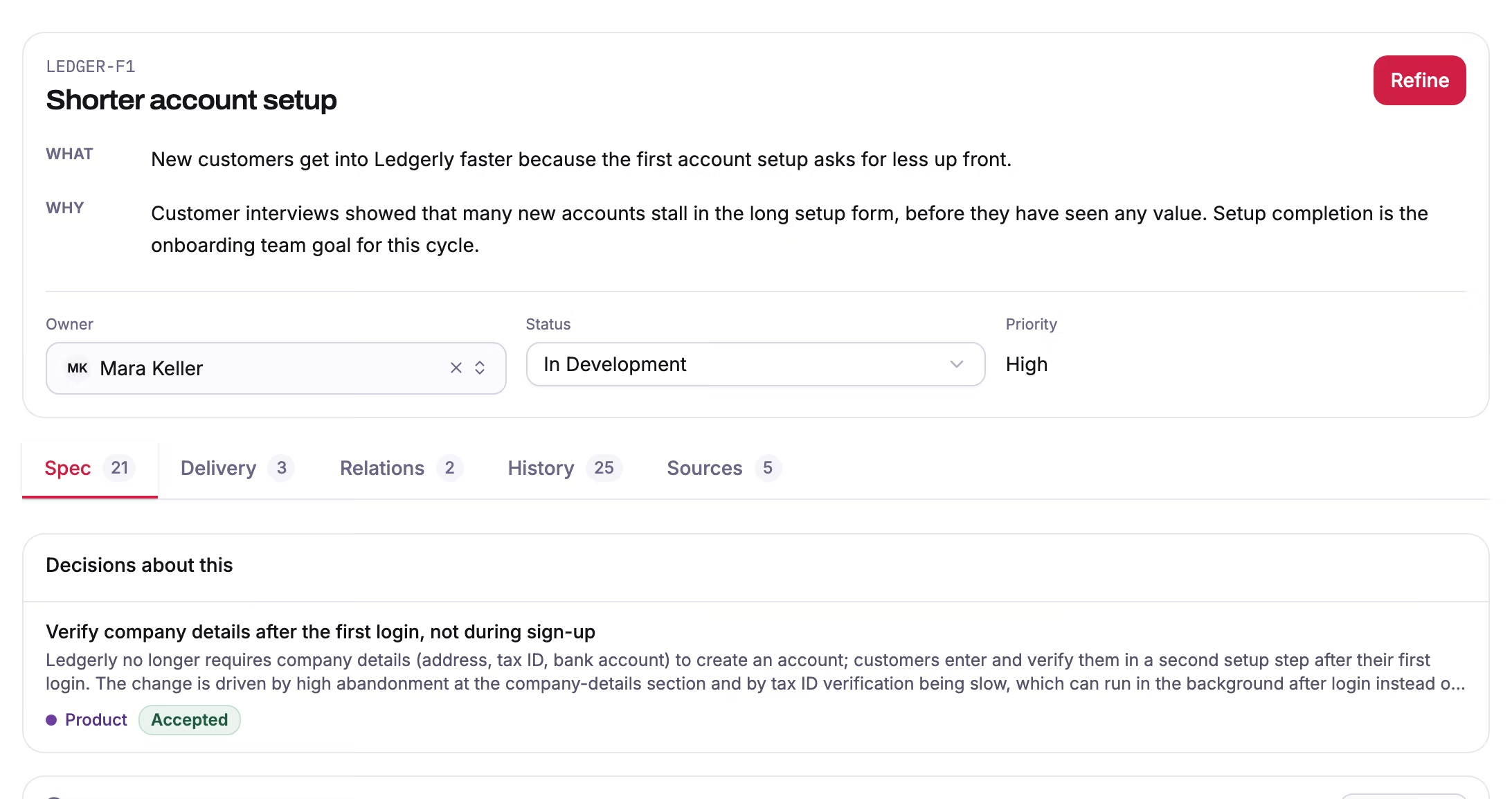
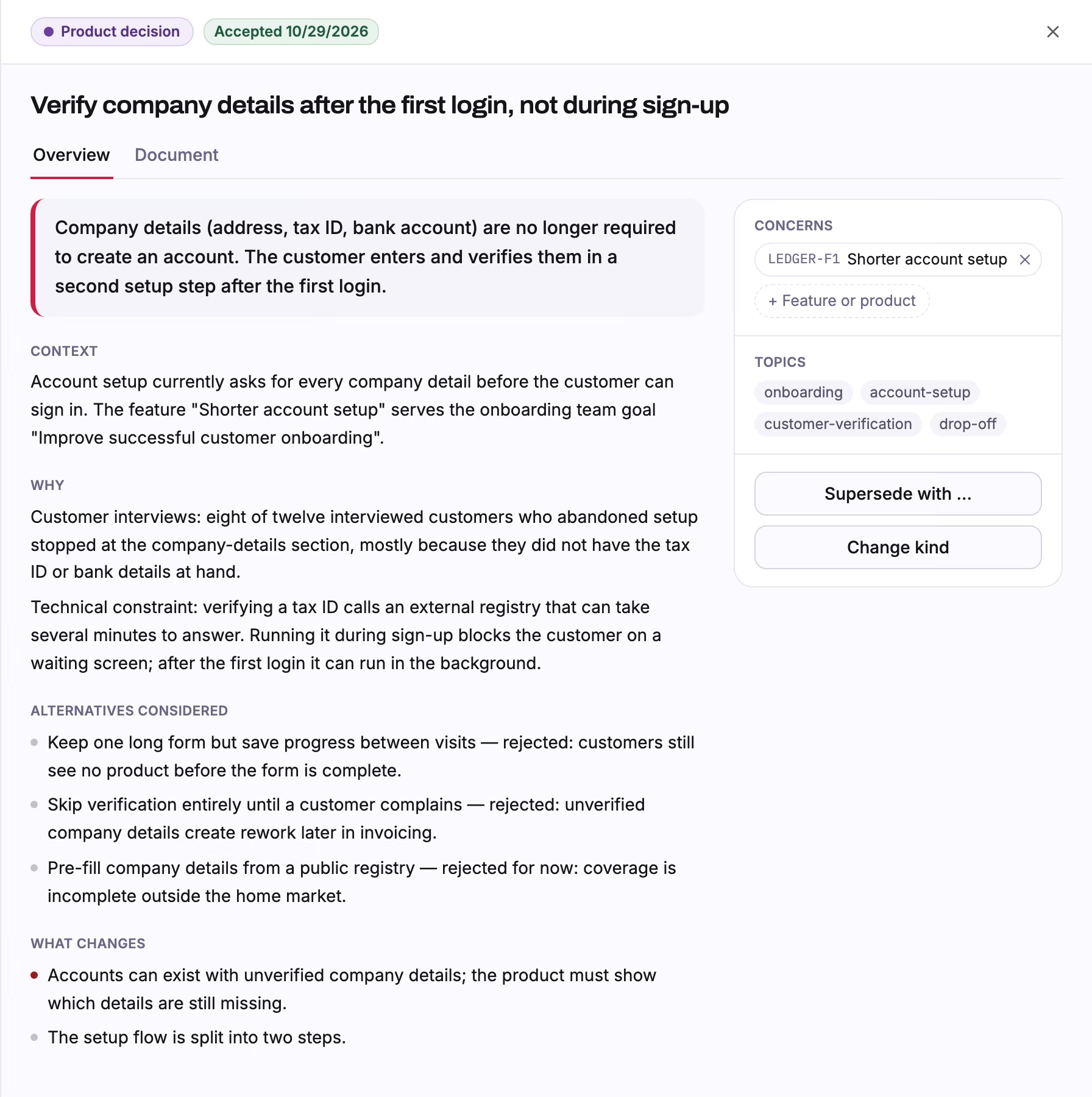
The onboarding example from this page, in Plenec itself: the feature, the goal it serves, and the decision behind it with its reasons.

How Align works
Consider a company that wants to improve its customer onboarding experience.
Customers are leaving before completing their accounts. Leadership wants to improve activation, Product has several ideas, and Engineering knows that parts of the existing process are technically complex.
Here's how the team can approach the work with Align.
- 1
Define the outcome
The team establishes the business goal: improve successful customer onboarding.
That gives everyone a common reference point for evaluating possible changes.
- 2
Explore the problem together
Product brings customer insights. Engineering identifies constraints and dependencies. Leadership clarifies business priorities.
The team discusses alternatives and agrees on an approach.
- 3
Connect decisions to the work
The agreed requirements, priorities, and decisions remain connected to the initiative.
Developers can understand the intended outcome and the reasoning behind the work they're asked to deliver.
- 4
Carry context into execution
When the team is ready to build, the relevant information is already connected.
Run can use that context to support planning and AI-assisted implementation, while developers remain responsible for directing and verifying the result.
Less time reconstructing context. More time solving problems.
When teams share the information behind their work, they can spend less time searching for answers and repeating conversations.
For leadership
Understand how product and development work relates to business priorities. Make trade-offs with better visibility into what the organization is trying to achieve.
For Product
Keep customer problems, priorities, and decisions connected to execution. Collaborate with Engineering without repeatedly translating the same information into different tools.
For Engineering
Understand the purpose behind requirements. Make better-informed technical decisions and identify missing assumptions before they become implementation problems.
For the whole team
Build a common understanding that carries across roles, conversations, and development activities.
Alignment is the starting point for AI-native development.
AI coding agents can implement software quickly. Their results still depend on the information they receive.
An agent working from an isolated ticket may understand the requested change but miss the customer problem, business rule, or technical decision behind it.
Align provides the connected product context needed to guide execution. That context becomes especially valuable as AI takes on more development work.
People can focus on understanding problems, evaluating alternatives, and making decisions. AI can support execution using the direction the team has established.
This is how Plenec connects human collaboration with AI-supported software development.
More human collaboration. Less manual coordination.
One connected process: Align, Run, Improve.
Align is the first part of Plenec's connected approach to software team performance.
Agree on what matters.
Connect business goals, product priorities, requirements, and decisions.
You are hereTurn decisions into execution.
Use shared context to support AI-assisted planning, implementation, and verification.
Learn more →Learn from delivery.
Understand performance, identify friction, and continuously improve how the team works.
Learn more →The three parts work together.
Decisions made in Align guide execution in Run. Insights from Improve help teams revisit priorities and refine their approach.
This creates a continuous connection between business intent, software delivery, and organizational learning.
Frequently asked questions
What is Align in Plenec?
Align is the part of the Plenec platform that connects business goals, product priorities, requirements, decisions, and ownership. It helps leadership, Product, and Engineering work from shared context.
How does Align help software teams?
Align makes the purpose and reasoning behind development work easier to understand. Teams can connect requirements to business outcomes, collaborate across functions, and carry relevant decisions into execution.
Is Align only for product managers?
No. Align is designed to support collaboration between leadership, Product, and Engineering. Each group contributes different information and uses the shared context to make better decisions.
How does Align work with AI coding agents?
Align connects the product information and decisions that guide development. Run uses relevant context to support AI-assisted execution, with people directing and verifying the results.
How are Align, Run, and Improve connected?
Align establishes direction and shared understanding. Run connects that context to execution. Improve helps teams evaluate outcomes and identify opportunities to work better. Together, they form Plenec's connected operating cycle.
Build software with a shared sense of direction.
When business goals, product decisions, and development work stay connected, teams can focus on solving the problems that matter.
Explore how Plenec brings alignment into everyday software development.